Following the Convention over Configuration principle in an ASP.NET MVC application the controller and action names form part of the URL. So commonly a URL of http://www.example.com/account/forgotpassword would break down to;
Domain: example.com
Controller: account
Action: forgotpassword
It is good SEO practise to separate words in a URL with hyphens. One reason for doing this is due to Google and how it interprets the URL. Google will not see underscores as a word separator, so forgot_password will be seen as forgotpassword, there is no benefit in having underscores at all.
When it comes to an MVC application you cannot have hyphens in the action names, the code will not even compile.
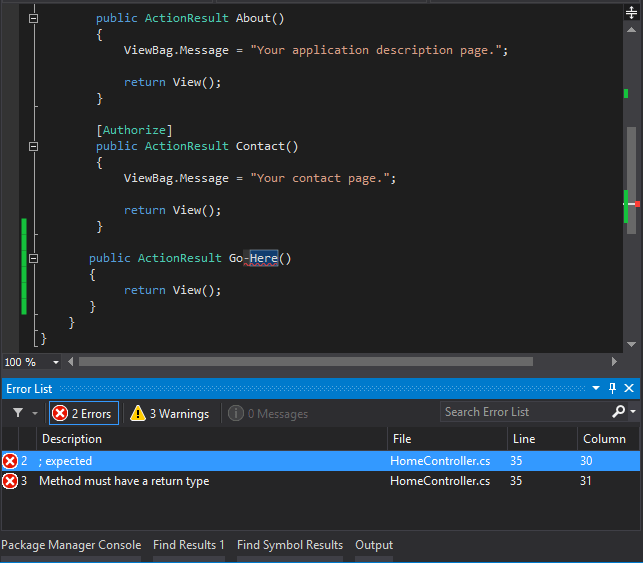
Fortunately there is a way to have hyphens in URLs by using the ActionName attribute on an action method. This method redefines the name used to access the action both from URL or direct code.
[AllowAnonymous]
[ActionName("forgot-password")]
public ActionResult ForgotPassword()
{
    return View("forgotpassword");
}

[AllowAnonymous]
[HttpPost]
[ActionName("forgot-password")]
public ActionResult ForgotPassword(ResetPasswordViewModel model)
{
    if (!ModelState.IsValid)
    {
        return View("forgotpassword", model);
    }

    // other code here

    return View("forgotpassword", model);
}
You can see here both the HttpGet and HttpPost action methods have been decorated with the ActionName attribute. When calling this ForgotPassword action the url will be
http://www.example.com/account/forgot-password
You can no longer call the action without a hyphen. If calling the action from within code, again you will need to use the new redefined action name
// in a controller
RedirectToAction("forgot-password");

// from a link
@Html.ActionLink("Forgot Password","forgotten-password","account")
You will also notice in the top example that the action method signature still contains a method name of ForgotPassword which is the same as the view name. Normally due to the conventions built into MVC you would not need to specify the view name
public ActionResult ForgotPassword()
{
    return View();
}
as the action name has been redefined, when using View() method to display the view the engine will be looking for a view called forgot-password. That is fine of you view is called forgot-password but if not you will need to pass the name of the view as a parameter to the View() method.
[ActionName("forgot-password")]
AtionResult ForgotPassword()
{
    return View("ForgotPassword");
}
