If you have a user input form on an ASP.NET site a RequiredFieldValidator will ensure the user enters a value in the associated field before the form can be submitted to the server.
On more complex forms one field may only be required depending on the value or selection of another field. A RequiredFieldValidator cannot be used as the associated field will always expect user input irrespective of any other field values. A CustomValidator can be used to customise the validation on either the client side, server side or both.
First we need an input form. If the Other radio button is selected a value must be entered in the textbox.
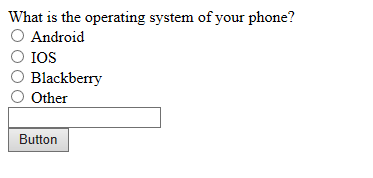
Here is the full html for the above form. The radio button group consists of individual radio buttons but a RadioButtonList would work too.
<form id="form1" runat="server">
<div>
 <asp:Label runat="server">What is the operating system of your phone?</asp:Label>
 <div>
 <asp:RadioButton ID="AndroidRadioButton" ClientIDMode="Static"
 runat="server" ValidationGroup="PHONEGROUP" GroupName="PhoneOSGroup" />
 <asp:Label ID="Label1" runat="server">Android</asp:Label>
 </div>
 <div>
 <asp:RadioButton ID="IOSRadioButton" ClientIDMode="Static"
 runat="server" ValidationGroup="PHONEGROUP" GroupName="PhoneOSGroup" />
 <asp:Label ID="Label2" runat="server">IOS</asp:Label></div>
 <div>
 <asp:RadioButton ID="BlackberryRadioButton" ClientIDMode="Static"
 runat="server" ValidationGroup="PHONEGROUP" GroupName="PhoneOSGroup" />
 <asp:Label ID="Label3" runat="server">Blackberry</asp:Label>
 </div>
 <div>
 <asp:RadioButton ID="OtherOSRadioButton" ClientIDMode="Static"
 runat="server" ValidationGroup="PHONEGROUP" GroupName="PhoneOSGroup" />
 <asp:Label ID="Label4" runat="server">Other</asp:Label><br />
 <asp:TextBox runat="server" ID="OtherOSTextBox" ClientIDMode="Static"></asp:TextBox>
 <asp:CustomValidator ID="OtherOSValidator" ClientIDMode="Static"
 runat="server" Display="Dynamic" Text="Specify Phone OS"
 ClientValidationFunction="PhoneOSValidation"
 OnServerValidate="PhoneOSValidation" ValidationGroup="PHONEGROUP">
 </asp:CustomValidator>
 </div>
 <asp:Button ID="GoButton" runat="server" Text="Button" ValidationGroup="PHONEGROUP"/>
</div>
</form>
On the custom validator the ClientValidationFunction attribute specifies which javascript method to call to validate the field.
<script type="text/javascript">
    function PhoneOSValidation(Source, args) {
        args.IsValid = true;
        var otherOSRadio = document.getElementById("OtherOSRadioButton");
        var otherOS = document.getElementById("OtherOSTextBox");
        if (otherOSRadio.checked) {
            args.IsValid = ( otherOS.value != "")
        }
    }
</script>
The OnServerValidate attribute specifies which server side code behing method to call to validate the user input.
protected void PhoneOSValidation(object source, ServerValidateEventArgs args)
{
    args.IsValid = true;
    if (OtherOSRadioButton.Checked)
    {
        args.IsValid = (OtherOSTextBox.Text.Length >= 1);
    }
}
If the client side PhoneOSValidation javascript method returns false the form will be invalid and will not be submitted.
If client side validation passes the server side PhoneOSValidation method in the code behind will be called when the page is submitted to the server. Because of the server validation you do not really need the client validation but it certainly doesn’t hurt.
In the button click event checking the Page IsValid property will be true if the form validation passes.
protected void GoButton_Click(object sender, EventArgs e)
{
    if (Page.IsValid)
    {

    }
}

You must be logged in to post a comment.