Another JQuery Autocomplete Example With ASP.NET Webforms

This is a quick run through of how to implement a jQuery autocomplete with webforms. The lookup data consists of about 600 items and changes very rarely so I want to load the data only once when the page loads rather than sending a query to the database as the user types in the input box.

On the Webform is a input box which will have autocomplete feature.

<div>
    <asp:Label ID="Label5" runat="server" Text="Depot Code:" AssociatedControlID="txtDepotCode" />
    <asp:TextBox ID="txtDepotCode" runat="server" ClientIDMode="Static" TabIndex="5" />
    <asp:TextBox ID="txtDepotName" runat="server" ClientIDMode="Static" TabIndex="6" />
</div>

In this javascript code a webservice is being called to retrieve the items via an ajax call. When the data is returned it is set as the source data for the autocomplete input box.

$(function () {
    $.ajax({
        type: "POST",
        contentType: "application/json; charset=utf-8",
        url: "creditqueryservice.asmx/GetDepots",
        dataType: "json"
    }).done(function (response) {
        var data = $.map(response.d, function (item) {
            return {
                value: item.DepotCode,
                label: item.DepotCode + ' - ' + item.DepotName
            };
        });

        $("#txtDepotCode").autocomplete({
            source: data,
            minLength: 2,
            select: function(event, ui) { 
                // do something here.  ui parameter holds the values of the item selected
                $("#" + this.id).val(ui.item.value);
                $("#" + this.id + "name").val(ui.item.DepotName);
                return false;
            }
        });
    });
});

The depots are retrieved via a repository (_branchesRepo) variable in the class. Retrieve the data suitable to your application.

[WebMethod]
public List<Depot> GetDepots()
{
    var depots = new List<Depot>();
     if (depots == null || depots.Count == 0)
    {
        depots = _branchesRepo.GetBranches();
    }
    return depots;
}

To validate what the user has entered the autocomplete data can retrieved as in the code below.

var source = $("#txtDepotCode").autocomplete("option", "source");

Now you can compare the value entered with the values in the list. You would really only do this if the user typed into the input box without selecting an item from the matched list.

Validate at least one option is selected in radio button list on Webform

On a webform there is a radiobutton list. The user must select at least one of the options for the form to be valid.

<div>
	<asp:Label ID="Label37" runat="server" Text="Is Sales Item:" AssociatedControlID="rblSaleItem" />
	<asp:RadioButtonList ID="rblSaleItem" runat="server" ClientIDMode="Static" TabIndex="36"
		RepeatDirection="Horizontal" RepeatLayout="Flow" CssClass="checkbox-list">
		<asp:ListItem Text="Yes" Value="1"></asp:ListItem>
		<asp:ListItem Text="No" Value="0"></asp:ListItem>
	</asp:RadioButtonList>
	<asp:CustomValidator ID="IsSaleItemCustomValidator" runat="server" Text="Is Sales Item: selection is required"
		Display="Dynamic" ClientIDMode="Static" ClientValidationFunction="IsSalesItemValidator"
		OnServerValidate="IsSalesItemValidation" ValidationGroup="FORMGROUP" CssClass="field-validation-error"></asp:CustomValidator>
</div>

Here we have the javascript validation. The radiobutton list and validator are in the same div element, so from the validation control triggered we go up to the parent to find the radiobutton list. Each radio button in the list is tested to see if it is selected.

// Javascript client side validation
function IsSalesItemValidator(sender, args) {
    args.IsValid = false;

    $("#" + sender.id).parent().find(".checkbox-list").find(":radio").each(function () {
        if ($(this).is(":checked")) {
            args.IsValid = true;
            return;
        }
    });
}

On the server side the validation works in a similar way.

// C# Server side validation
protected void IsSalesItemValidation(object source, ServerValidateEventArgs args)
{
    // has a sale item check box been selected
    foreach (ListItem li in rblSaleItem.Items)
    {
        if (li.Selected)
        {
            args.IsValid = true;
            break;
        }
    }
}

I actually do not like the idea of iterating through the radiobutton list to find if one is checked. Normally the radiobutton lists are quite short on a page so it is probably not a big overhead, but it is too old school lazy coding for my liking. In .Net3.5 the Enumerable class was introduced in the System.Linq namespace. Unsing the Enumerable.Cast method we can construct linq queries to retrieve the selected item from the radiobutton list instead of iterating all the items.

protected void IsSalesItemValidation(object source, ServerValidateEventArgs args)
{
    var selectedItem = (from li in rblSaleItem.Items.Cast<ListItem>()
                        where li.Selected == true
                        select li).FirstOrDefault();
    /*
    // Alternatively if you prefer inline linq
    var selectedItem = rblSaleItem.Items.Cast<ListItem>()
                        .Where(item => item.Selected == true).FirstOrDefault();
    */
    
    args.IsValid = SelectedItem != null && SelectedItem.Selected;
}

Using the FirstOrDefault() method will return null if there are not selected items in the radiobutton list. If we were to use the First() method an InvalidOperationException would be thrown if there are no elements that meet the query conditions.
It is safe to use the Cast method in this situation because it is guaranteed all the items in the collection are of the ListItem type. If the Cast method was used on a collection containing different objects an InvalidCastException will be thrown. If the collection object itself is null an ArgumentNullException will be thrown.

ASP.NET Conditional Required Field Validation on Client and Server Side

If you have a user input form on an ASP.NET site a RequiredFieldValidator will ensure the user enters a value in the associated field before the form can be submitted to the server.
On more complex forms one field may only be required depending on the value or selection of another field. A RequiredFieldValidator cannot be used as the associated field will always expect user input irrespective of any other field values. A CustomValidator can be used to customise the validation on either the client side, server side or both.

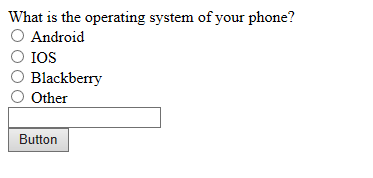
First we need an input form. If the Other radio button is selected a value must be entered in the textbox.
conditional-validation
Here is the full html for the above form. The radio button group consists of individual radio buttons but a RadioButtonList would work too.

<form id="form1" runat="server">
<div>
 <asp:Label runat="server">What is the operating system of your phone?</asp:Label>
 <div>
 <asp:RadioButton ID="AndroidRadioButton" ClientIDMode="Static"
 runat="server" ValidationGroup="PHONEGROUP" GroupName="PhoneOSGroup" />
 <asp:Label ID="Label1" runat="server">Android</asp:Label>
 </div>
 <div>
 <asp:RadioButton ID="IOSRadioButton" ClientIDMode="Static"
 runat="server" ValidationGroup="PHONEGROUP" GroupName="PhoneOSGroup" />
 <asp:Label ID="Label2" runat="server">IOS</asp:Label></div>
 <div>
 <asp:RadioButton ID="BlackberryRadioButton" ClientIDMode="Static"
 runat="server" ValidationGroup="PHONEGROUP" GroupName="PhoneOSGroup" />
 <asp:Label ID="Label3" runat="server">Blackberry</asp:Label>
 </div>
 <div>
 <asp:RadioButton ID="OtherOSRadioButton" ClientIDMode="Static"
 runat="server" ValidationGroup="PHONEGROUP" GroupName="PhoneOSGroup" />
 <asp:Label ID="Label4" runat="server">Other</asp:Label><br />
 <asp:TextBox runat="server" ID="OtherOSTextBox" ClientIDMode="Static"></asp:TextBox>
 <asp:CustomValidator ID="OtherOSValidator" ClientIDMode="Static"
 runat="server" Display="Dynamic" Text="Specify Phone OS"
 ClientValidationFunction="PhoneOSValidation"
 OnServerValidate="PhoneOSValidation" ValidationGroup="PHONEGROUP">
 </asp:CustomValidator>
 </div>
 <asp:Button ID="GoButton" runat="server" Text="Button" ValidationGroup="PHONEGROUP"/>
</div>
</form>

On the custom validator the ClientValidationFunction attribute specifies which javascript method to call to validate the field.

<script type="text/javascript">
    function PhoneOSValidation(Source, args) {
        args.IsValid = true;
        var otherOSRadio = document.getElementById("OtherOSRadioButton");
        var otherOS = document.getElementById("OtherOSTextBox");
        if (otherOSRadio.checked) {
            args.IsValid = ( otherOS.value != "")
        }
    }
</script>

The OnServerValidate attribute specifies which server side code behing method to call to validate the user input.

protected void PhoneOSValidation(object source, ServerValidateEventArgs args)
{
    args.IsValid = true;
    if (OtherOSRadioButton.Checked)
    {
        args.IsValid = (OtherOSTextBox.Text.Length >= 1);
    }
}

If the client side PhoneOSValidation javascript method returns false the form will be invalid and will not be submitted.
If client side validation passes the server side PhoneOSValidation method in the code behind will be called when the page is submitted to the server. Because of the server validation you do not really need the client validation but it certainly doesn’t hurt.

In the button click event checking the Page IsValid property will be true if the form validation passes.

protected void GoButton_Click(object sender, EventArgs e)
{
    if (Page.IsValid)
    {
 
    }
}